Monday, September 3, 2018

How to start angular development

This blog post aim to start the development environment with Angular as quickly as possible.

Prerequisites
  1. Install npm and node latest versions
    In my computer, node version : v8.10.0, npm version : 3.5.2
  2. Install angular cli. Use below command  to install angular cli.
    npm install -g @angular/cli
    My Angular CLI version : 6.1.2. Type ng -v to see angular CLI version.
  3. Install visual code editor. This editor is great tool with lot of helper plugins to start with angular development.
Now time to create new angular project!

1. Type below command to create a new project called test-app

ng new test-app

This will create basic project scaffolding to start with. Now go to test-app folder and start a development server from there

cd test-app
ng serve --open

This will open browser window automatically at http://localhost:4200/ url.

Now time to hack the generated project code and create an awesome project!
Type code . to open the code in visual code editor.


Monday, July 2, 2018

Boost the speed of calculating Large Primes with Golang

Following points are used

1. Check whether the last digit of the integer can be divided by 2 or not
2. Check whether the sum of all digits of the integer can be divided by 3 or not
3. Check whether the last digit of the integer can be divided by 5 or not
4. If all the above checks fails Check whether there is an integer from 7 to square root of number which is divide the number


package main import ( "fmt" "math" "strconv" ) func main() { fmt.Printf("275489 is a prime : %t", isPrime(275489)) } func isPrime(num int) bool { if !canBeDivideBy2(num) && !canBeDivideBy3(num) && !canBeDivideBy5(num) { isPrime := true //If the number can not be divided by 2, 3 or 5 divide from 7 to squre root of the number to check the existence of a factor for i := 7; i <= int(math.Sqrt(float64(num))); i++ { if num%i == 0 { isPrime = false break } } return isPrime } return false } // If the last digit can be divided by 2 whole number can be divided by 2 func canBeDivideBy2(num int) bool { numAsStr := strconv.Itoa(num) lastNum, _ := strconv.Atoi(string(numAsStr[len(numAsStr)-1])) return lastNum%2 == 0 } // If the digit sum can be divided by 3 whole number can be divided by 3 func canBeDivideBy3(num int) bool { numAsStr := strconv.Itoa(num) sum := 0 for i := 0; i < len(numAsStr); i++ { iThNum, _ := strconv.Atoi(string(numAsStr[i])) sum += iThNum } return sum%3 == 0 } //If the last digit can be divided by 5 whole number can be divided by 5 func canBeDivideBy5(num int) bool { numAsStr := strconv.Itoa(num) lastNum, _ := strconv.Atoi(string(numAsStr[len(numAsStr)-1])) return lastNum%5 == 0 }

Check last JRE access time

JRE will create and update a file in a directory called oracle_jre_usage located  in
  • Windows : %ProgramData%\Oracle\Java\.oracle_jre-usage\ 
  • All other operating systems: ${user.home}/.oracle_jre_usage/
ex: I have used ubuntu 18.04. So when I start intellij idea it will create a file like  below

lakshman@lakshman-Latitude-3580:~/.oracle_jre_usage$ vim 9e360713136aba0a.timestamp

File content is as follows

/usr/lib/jvm/java-8-oracle/jre
1530512372457
~       

As you can see the last access time can be found in timestamp format.

From JDK 8u171 and later updates and JDK 10 and later, usage tracking can be disabled by using jdk.disableLastUsageTracking property.

ex: java -Djdk.disableLastUsageTracking=true -jar lastUsageTracking-executable.jar

Wednesday, July 5, 2017

PDF generation with Apache FOP

What is Apache FOP?
Apache FOP is a print formatter driven by XSL formatting objects(XSL-FO). It is a library to read XSL FO objects and generate documents with specified output format. Here I have used pdf as the output format.

What is XSL?

XSL is a language for expressing stylesheets. It describes how to display data in an XML file.

What is XSL FO?

XSL FO is a part of XSL which is a markup language for XML document formatting. Follow W3school tutorial for XSL FO.

How Apache FOP generate PDFs.


I have generated javaFX form to enter the data and when I click the print button after filling data, PDF will be created in a folder called PDFs. source code for this available in https://github.com/laki88/PatientDischargeForm.


Thursday, March 23, 2017

JDBC drivers and connection strings

Recently I was fixing a bug in gadget creation in WSO2 DAS 3.1.0 in which gadget creation throws errors on some database types. So I have to check for major database types for gadget creation and I came up with following database drivers and connection strings and little more information their JDBC drivers.

MySQL
Driver class : com.mysql.jdbc.Driver
Connection string : jdbc:mysql://localhost:3306/databaseName

You can download JDBC driver from their official site.

MSSQL
Driver class : com.microsoft.sqlserver.jdbc.SQLServerDriver
Connection string :jdbc:sqlserver://hostName:1433;database=databaseName

You can download MSSQL driver from microsoft site. According to the JRE it comes from several flavours as below.

• Sqljdbc41.jar requires a JRE of 7 and supports the JDBC 4.1 API
• Sqljdbc42.jar requires a JRE of 8 and supports the JDBC 4.2 API

Apart from official MSSQL driver there are other supported drivers like jtds as well. You can find more information about them by referring this stackoverflow question.

PostgreSQL
Driver class : org.postgresql.Driver
Connection string : jdbc:postgresql://localhost:5432/databaseName

You can download the PostgreSQL driver from their official site and it also comes in different flavours depend on the Java version. It would be very easy to work with PostgresSQL if you are using postgres.app. For mac users, note that to uninstall all previous versions of PostgreSQL versions to work with postgres app.

DB2
Driver class : com.ibm.db2.jcc.DB2Driver
Connection string : jdbc:db2://myhost:5021/mydb

You can download db2 JDBC driver from their official site.

Oracle
Driver class : oracle.jdbc.OracleDriver
Connection string : jdbc:oracle:thin:@hostName:1521/wso2qa11g

You can download Oracle JDBC driver from their official site.

Tuesday, February 28, 2017

Simple wait and notify example in Java

This example demonstrate wait and notify example. Main thread(ThreadA) will create threadB and will start threadB. After threadB started, it just print that it is started and will go to WAITING state by calling wait(). Meanwhile threadA goes to sleep for 3 seconds and will print that it is awaked and will notify threadB by calling notify(). This will cause to threadB goes to RUNNABLE state. Then it will resume the threadB's execution and will print that it is notified.


Note that when we call wait() and notify(), it should call inside synchronised context. Otherwise it will throw java.lang.IllegalMonitorStateException. We have to pass a lock object to the synchronised block. That object will be blocked during the execution of synchronisation block. In this case I pass the threadB itself as the lock object.

Monday, January 23, 2017

Customize the place where tomcat instance creating for wso2 4.4.x servers

WSO2 4.4.x servers run on an OSGIfied tomcat. It creates the tomcat instance on <CARBON_HOME>/lib/tomcat directory. You can customize this path to your own one by changing the property "catalina.base" in wso2server.sh.

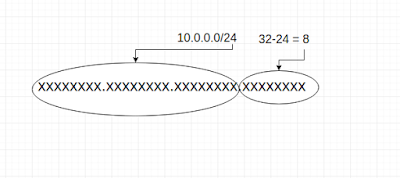
How to choose IP address range for resources for AWS virtual private cloud

You will often need to allocate  an IP address range when you design the network of an AWS VPC. Since VPC is a small network of resources(E...